
Script reference
The pm object, assertions, console output, and the limits of the script sandbox.
Schemo scripts use a Postman-compatible subset of the pm API, so most checks written for Postman run unchanged. Write them in Scripts on a request, folder, or collection. See Scripts and collection runs for the workflow.
When scripts run
| Phase | Runs | Can use |
|---|---|---|
| Pre-request | Before the request is sent, with variables already substituted | pm.request, variables, pm.execution.skipRequest() |
| Post-response | After the response arrives | pm.response, pm.test, pm.expect, variables |
Scripts run from the outside in: the collection’s script first, then each folder’s, then the request’s own. An error in one script does not stop the next level. In the post-response phase, each level’s captures update their variables before its script runs, so the script can read the new values.
Variables
| Call | Reads or writes |
|---|---|
pm.environment.get(name), .set(name, value), .has(name) | The active environment, or the environment pinned to the request. |
pm.globals.get(name), .set(name, value), .has(name) | Workspace globals. |
pm.variables.get(name), .has(name) | The value the request would resolve: environment first, then globals. |
pm.variables.set(name, value) | A value for the current run only. It is gone when the run ends. |
Values are stored as strings. set on the environment or globals changes the saved value.
const { access_token } = pm.response.json();
pm.environment.set('accessToken', access_token);
To keep a response value in sync without a script, use a capture.
The request
In a pre-request script, pm.request describes the request that is about to go out. Changes you make are what Schemo sends.
| Member | Use |
|---|---|
pm.request.method | The method, such as GET. |
pm.request.url | The full address as a string. Assign a new string to change it. |
pm.request.body | The body text. Binary and file bodies read as an empty string. |
pm.request.headers.get(name), .has(name), .all() | Read headers. Names are case-insensitive. |
pm.request.headers.add({ key, value }) | Add a header. |
pm.request.headers.upsert({ key, value }) | Add a header, or replace the one with the same name. |
pm.request.headers.remove(name) | Remove every header with that name. |
pm.execution.skipRequest() | Do not send the request. In a collection run, the runner marks it as skipped. |
pm.request.headers.upsert({ key: 'X-Request-Id', value: String(Date.now()) });
if (!pm.environment.has('accessToken')) pm.execution.skipRequest();
The response
In a post-response script, pm.response describes what came back.
| Member | Value |
|---|---|
pm.response.code | The status code, such as 200. |
pm.response.status | The status text, such as OK. |
pm.response.responseTime | The time to the response, in milliseconds. |
pm.response.headers.get(name), .has(name), .all() | Response headers. |
pm.response.text() | The body as text. |
pm.response.json() | The parsed body. Throws if the body is not valid JSON. |
Tests and assertions
pm.test(name, fn) records one check. If fn throws, that check fails and the script carries on, so a script with five checks reports all five.
pm.expect(value) starts an assertion. The words to, be, been, is, that, which, and, has, have, with, at, of, same, but, and does only make the line readable. not reverses the assertion that follows.
| Assertion | Passes when |
|---|---|
.equal(x) | The value is x (===). |
.eql(x) | The value deeply equals x. Key order does not matter. |
.a(type) | The type is string, number, boolean, object, array, null, or undefined. |
.include(x) | A string contains x, an array contains an item equal to x, or an object contains the keys and values of x. |
.property(name), .property(name, x) | The object has the key, optionally with the value x. |
.length(n) | A string or array has length n. |
.match(regex) | A string matches the regular expression. |
.above(n), .below(n), .least(n), .most(n) | The number is greater than, less than, at least, or at most n. |
.oneOf(list) | The value equals one of the items in list. |
.true, .false, .null, .undefined, .ok, .exist, .empty | The value is that literal, truthy, not null or undefined, or an empty string, array, or object. |
pm.test('Order belongs to the demo customer', () => {
  const order = pm.response.json();
  pm.expect(pm.response.code).to.equal(200);
  pm.expect(order).to.have.property('id', 'o-3207');
  pm.expect(order.items).to.have.length(2);
  pm.expect(order.customer.email).to.match(/@example\.com$/);
  pm.expect(pm.response.responseTime).to.be.below(500);
});
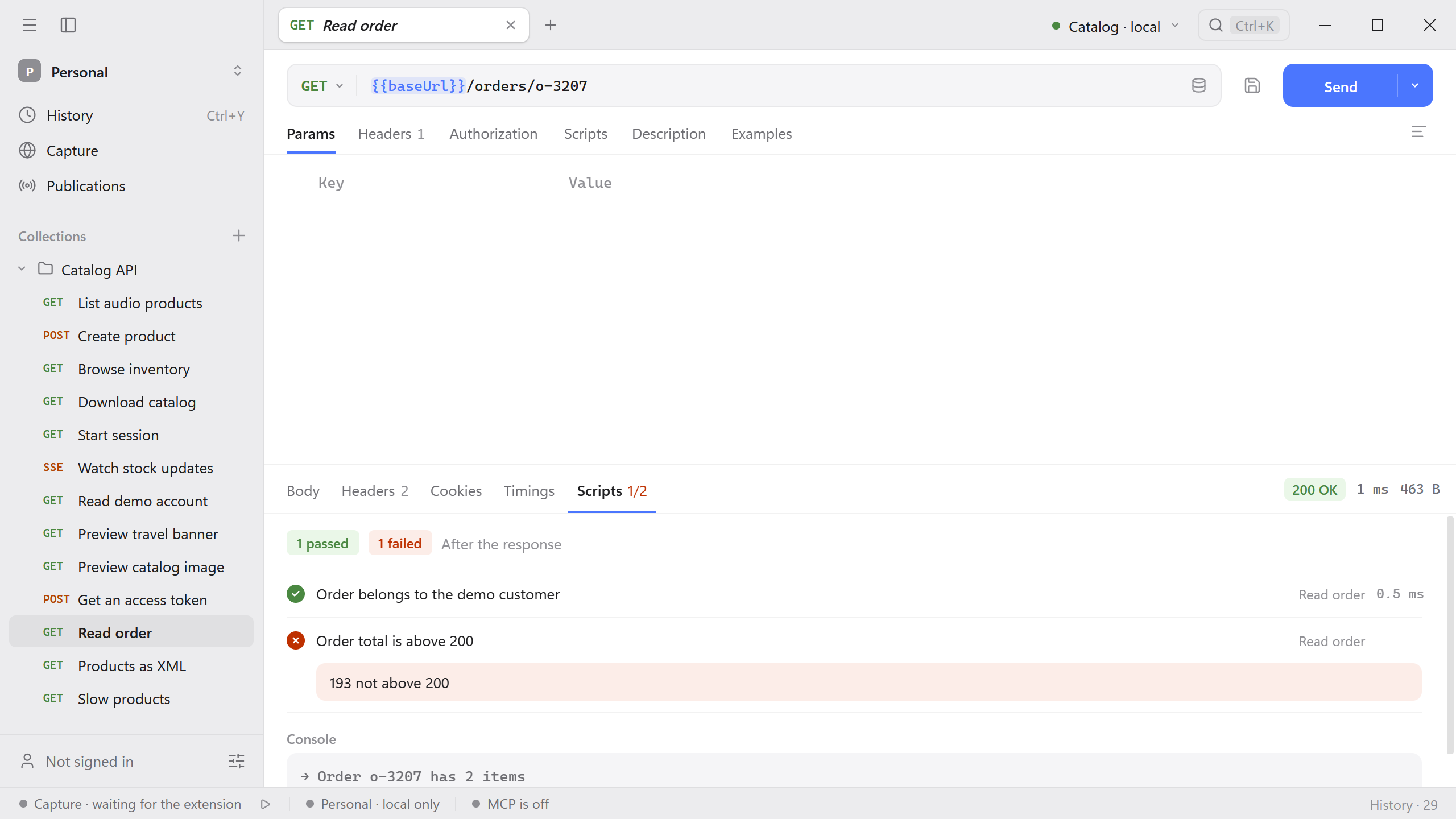
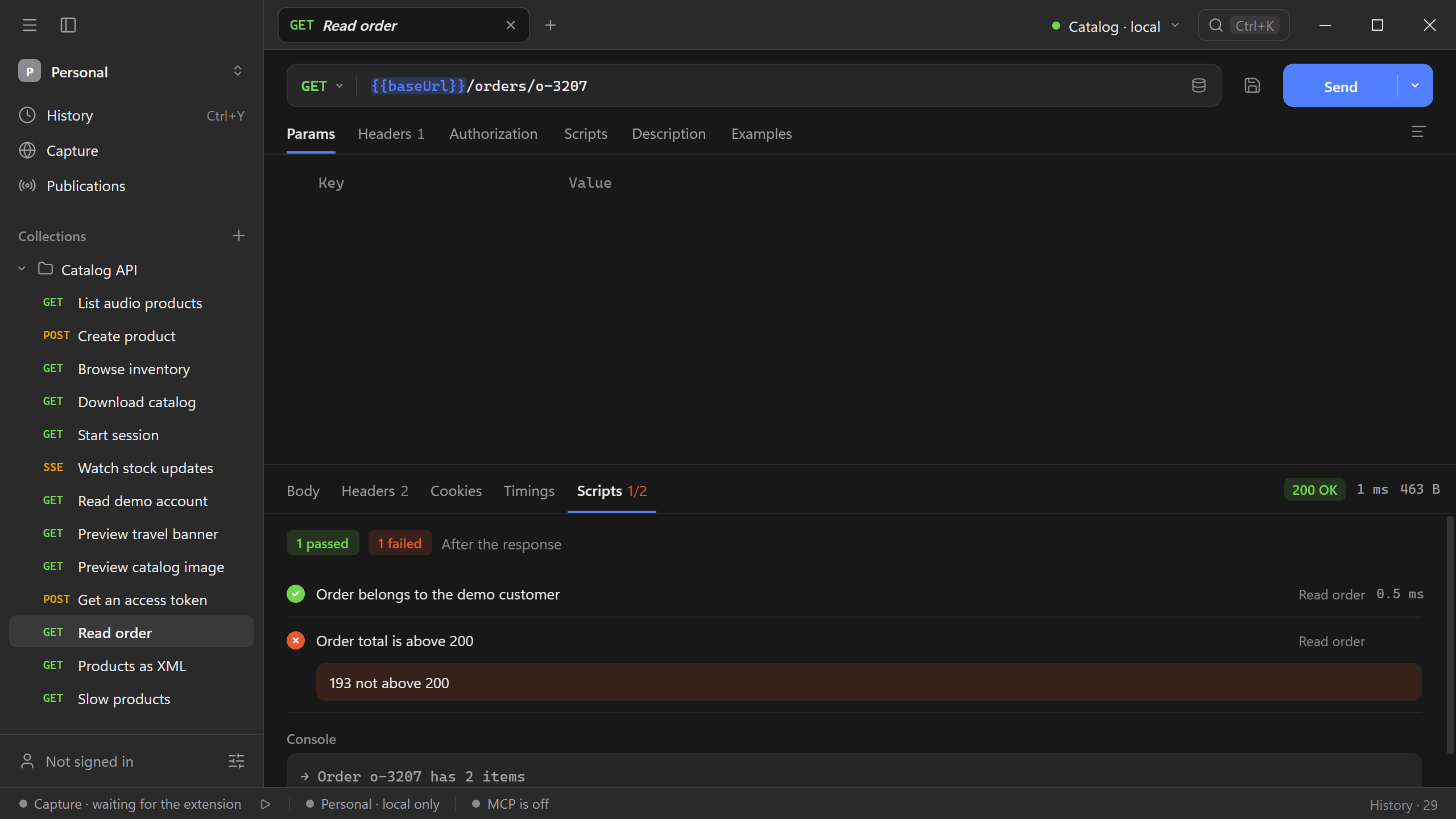
A failed check reports what was expected and what came back, such as expected 2, got 3. To write a check without typing the path, select a value in the response tree and choose Add a script assertion.
Console output
console.log, info, warn, error, and debug write to Console in the response Scripts tab. Objects are printed as JSON.
Limits
Scripts run in a sandbox inside Schemo:
- No network, file system, timers, or
require. Send another request as its own step in a collection instead. - A script stops after 5 seconds.
- A report keeps up to 200 checks and 200 console lines. Longer lines are truncated.